4.5 Reading the Metrics panel
Metrics are recomputed every frame from a real raycast: a central ray plus the four corners of the frame, fired at whatever geometry is in the way.
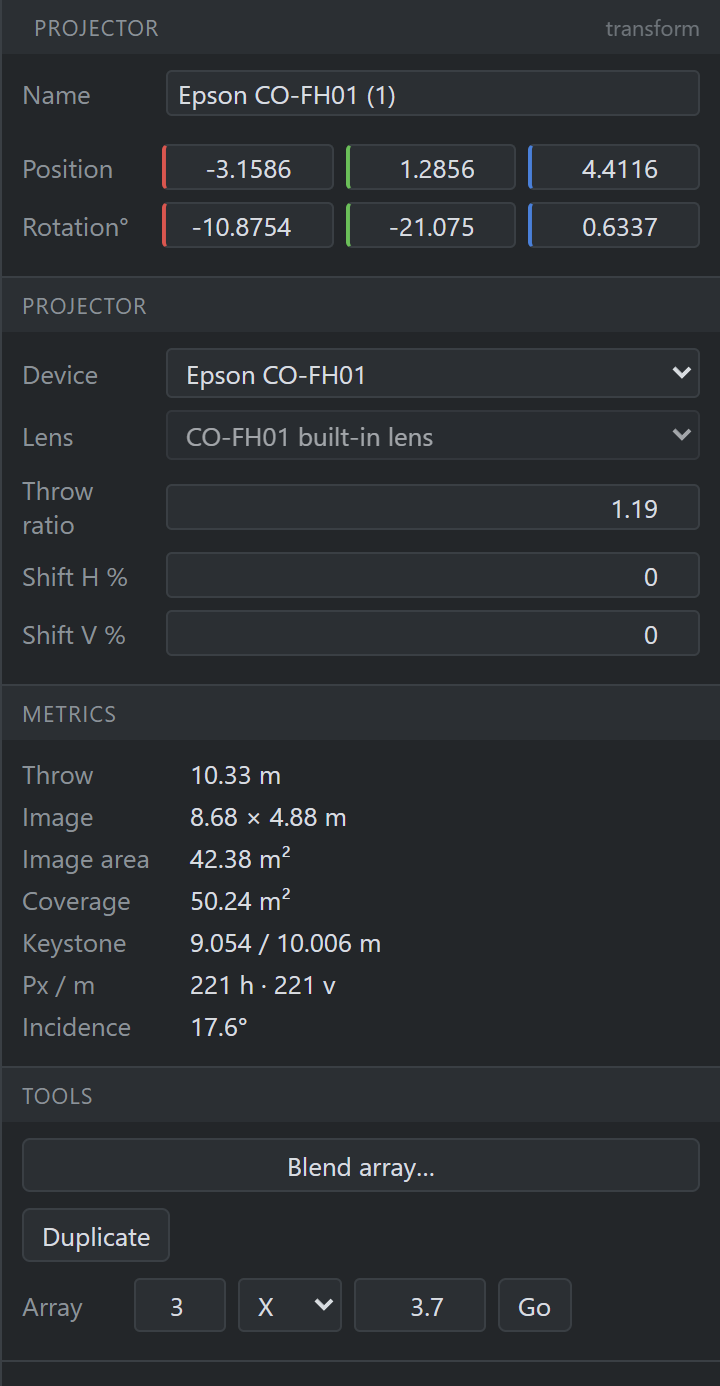
- Name — this instance, not the model.
- Transform — position and rotation, local to the parent.
- Device — which definition this is an instance of.
- Lens — which of the device’s compatible lenses is mounted.
- Throw ratio — clamped to the mounted lens’s range.
- Shift H / V — percent of image width / height.
- Metrics — everything below is measured, not entered.
- Image — width × height where the beam lands.
- Keystone — true top and bottom edge widths (§4.6).
- Px / m — delivered pixel density, horizontal and vertical.
- Tools — blend array, duplicate, linear array.
| Metric | Meaning |
|---|---|
| Throw | Distance from the lens to the surface along the optical axis. |
| Image | The image the optics make at that distance: w = d/TR, h = w/aspect. |
| Image area | Area of that rectangle — the divisor in the lux calculation. |
| Coverage | Area of the polygon actually landing on geometry. Lower than image area when the beam spills off an edge. |
| Keystone | True top / bottom edge widths. Equal on a square-on machine; unequal when tilted. |
| Px / m | Delivered pixels per metre. The number to argue about viewing distance with. |
| Incidence | Angle between the beam and the surface normal. Light falls off with its cosine. |
If a projector hits nothing, the panel says so and gives the reason rather than showing stale numbers.