2.1 Anatomy of the window
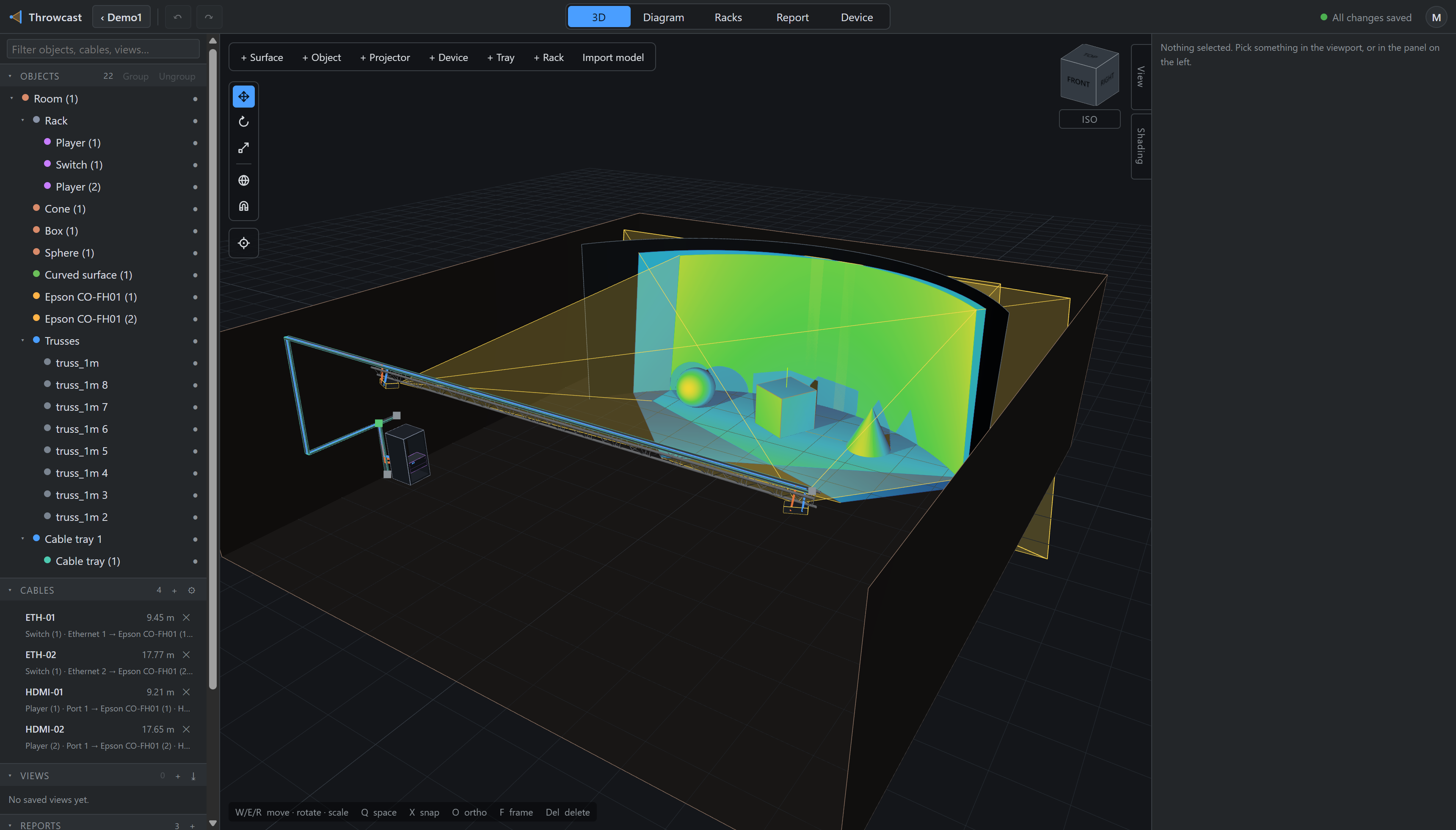
- Project chip — back to your projects. Beside it, undo and redo.
- Mode switcher — 3D, Device, Diagram, Racks, Report, left to right in the order the work goes: the venue, then what stands in it, then how it is wired, then how it is racked, then what you hand over.
- Save state — “All changes saved”, or a spinner while writing. Beside it, a muted Manual link that opens this document in a new tab, and the account menu.
- Filter — narrows every section of the browser at once.
- Objects — the scene tree: what is in the venue, and what rides what.
- Cables, Views, Reports, Blend arrays — the other four sections.
- Add cluster — surface, object, projector, device, tray, rack, import.
- Gizmo rail — move, rotate, scale; world ↔ local; snapping.
- Hover probe — lux and pixel density under the cursor.
- Edge tabs — the View and Shading panels.
- Inspector — properties of whatever is focused.
Both side panels are draggable between 200 and 480 px, and their widths are remembered between sessions. They are one of only two things Throwcast keeps in your browser rather than in the project; the other is what the viewport draws (beams, footprints, cables, labels, grid).