11.7 Schedules: cables and equipment
Two tables, both derived from the project every time they are drawn — no cache, no stale badge, always current.
The cable schedule (+ Cables) is what to order and where
each run goes: Name, Type, From, To, Length, Slack. It sorts by type and then by the number
in the name, so HDMI 10 lands after HDMI 9 rather than beside HDMI 1. A run with an unplaced end
reads unplaced, never 0.00 m: the FOH rack nobody has modelled has no
length to measure, and a zero is what has somebody order no cable.
The equipment list (+ Equipment) is what is in the rig: Qty, Kind, Model, Details, Location. It groups identical machines, and location is part of the key — two of the same switcher in one rack are a row of qty 2, the same switcher in two racks is two rows. The list is for building a rack as well as for buying the kit, and collapsing those would answer “how many” while losing “where”. Model is the model’s name, never the instance’s: nobody orders a “Projector 07”.
Either can be grouped — by cable type, by device kind — into bands carrying a count and a total, and filtered to one rack or one diagram section, section membership being geometric and derived exactly as it is in the diagram (§8.3). A filtered block captions itself with what narrowed it.
A schedule is auto-height: it ignores the height you drag and grows to its rows, stopping at the bottom of the page. It offers only the width grips, and its inspector Height reads auto.
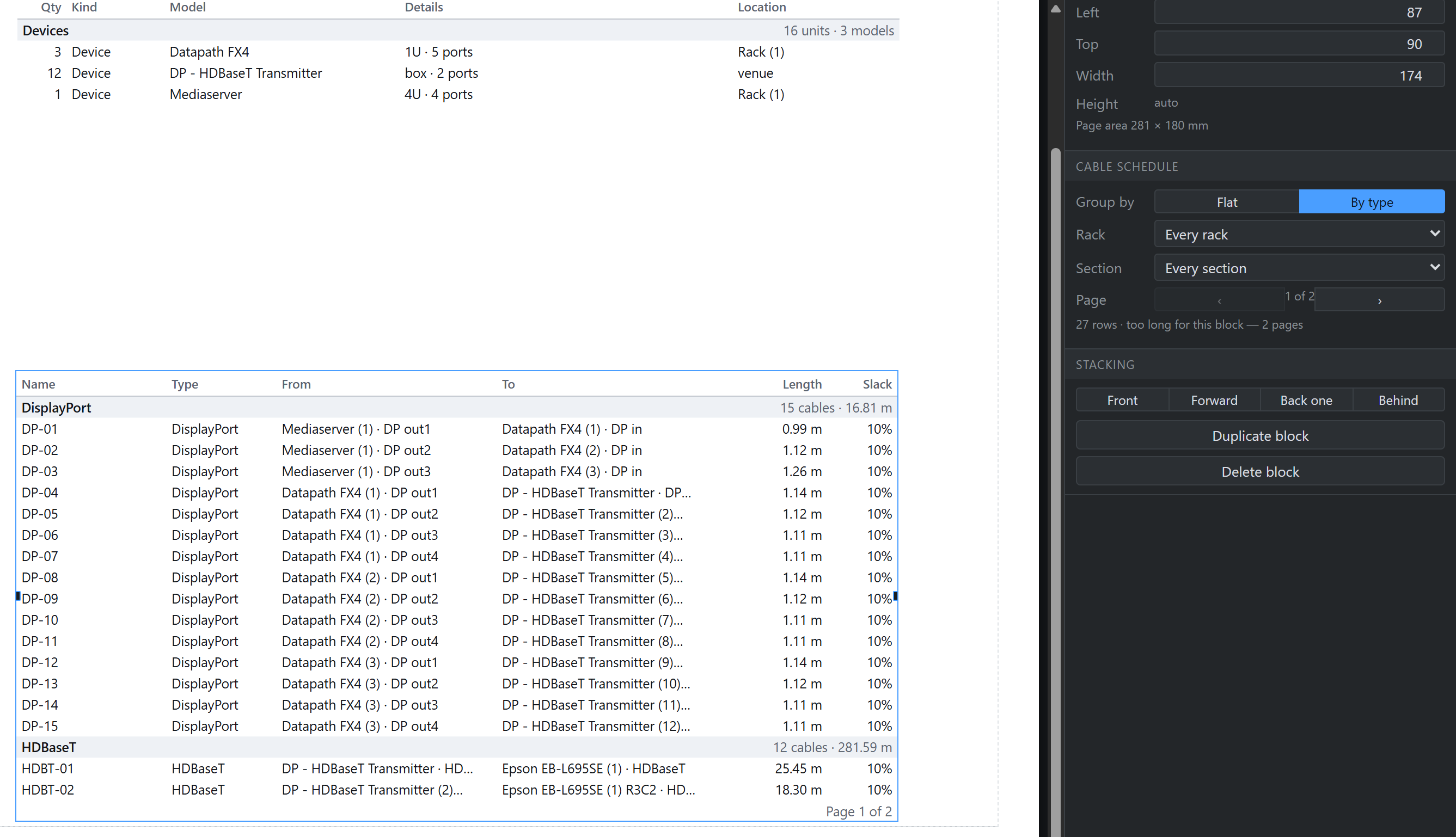
A layout page is one PDF page, so a table cannot flow onto a second sheet by itself. Instead the rows are cut into pages of the same size and the inspector’s Page control picks which one this block prints: put another schedule block on the next sheet, step it to page 2, and the list continues. Each page spends its last line on a dim Page 2 of 3 — which is what makes the pages equal and what tells you there is more to place — and a page that opens inside a grouped band repeats it as HDMI (cont.). The amber warning survives for the case that really is a fault: a block so near the foot of the page that nothing fits under its header at all.
What you see is what prints, in the strong sense: the sheet and the PDF are drawn from one layout pass in millimetres, so 1 of 4 on the panel and Page 1 of 4 on the paper cannot disagree.