Throwcast Manual
Ctrl K
PDF
Chapter 7The device library

7.4 Ports

A socket’s position is part of the definition: a face, plus an offset from that face’s centre. Storing it that way means a body that gets resized clamps its panel back on rather than leaving sockets floating in mid-air.
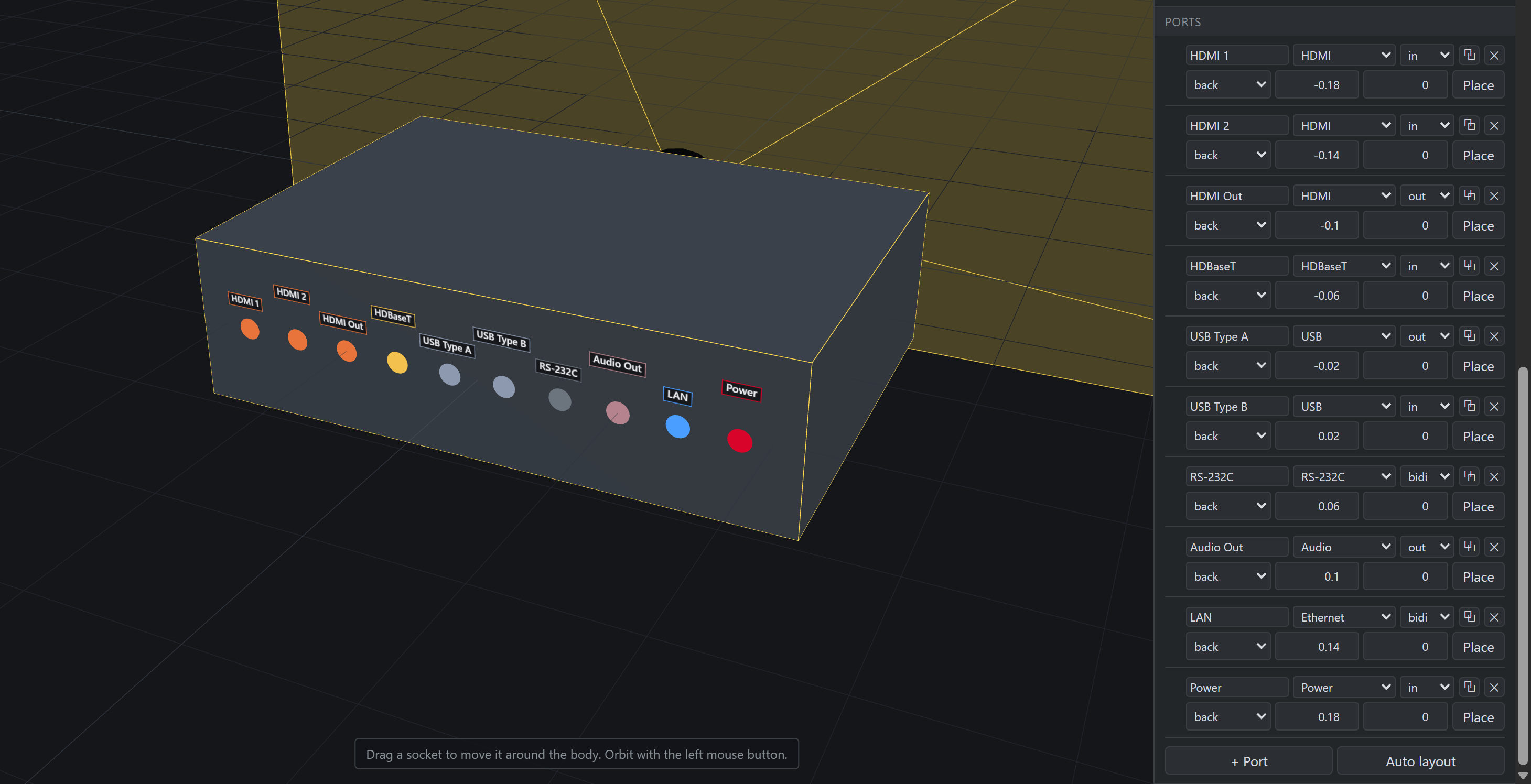
The EB-L695SE's back panel in the 3D preview, beside the Ports section
Figure 7.4 The EB-L695SE’s panel in both the places it exists: ten sockets on the machine’s own back face, and the rows that put them there. Each row takes two lines — a name, its type and its direction, then the face it sits on and its offset across and up from that face’s centre. The two are one thing seen twice: drag a socket on the body and the numbers follow it, Place arms a click for putting one down by pointing, and duplicates a socket beside its twin — which is how a row of four HDMIs gets built. The preview opens on the machine’s front; this is it orbited round to the back, where this projector keeps everything.

Faces are measured on the cabinet. A projector whose lens head stands proud of the cabinet has a back panel only cabinet-high, and the head’s own faces are not offered.

Auto layout in the Ports section re-spreads every socket across the back to fit the body’s current size: one centred row at 40 mm pitch, wrapping to further rows when the panel is wider than the machine. It is a button rather than an automatic response to a dimension edit, so a panel someone arranged by hand stays arranged.