7.5 The projection scheme
For a projector or a lens, the centre of the Device tab offers a second tab beside the 3D preview: a vendor-style Projection Scheme — a 2D throw diagram in side and top elevation, with dimension lines.
It is driven by a calculator that is not part of the project: distance and image width solve each other, zoom slides through the throw-ratio range, and shift and aspect are live. A Fix pin on either distance or image width makes zoom drive only the other, which goes read-only.
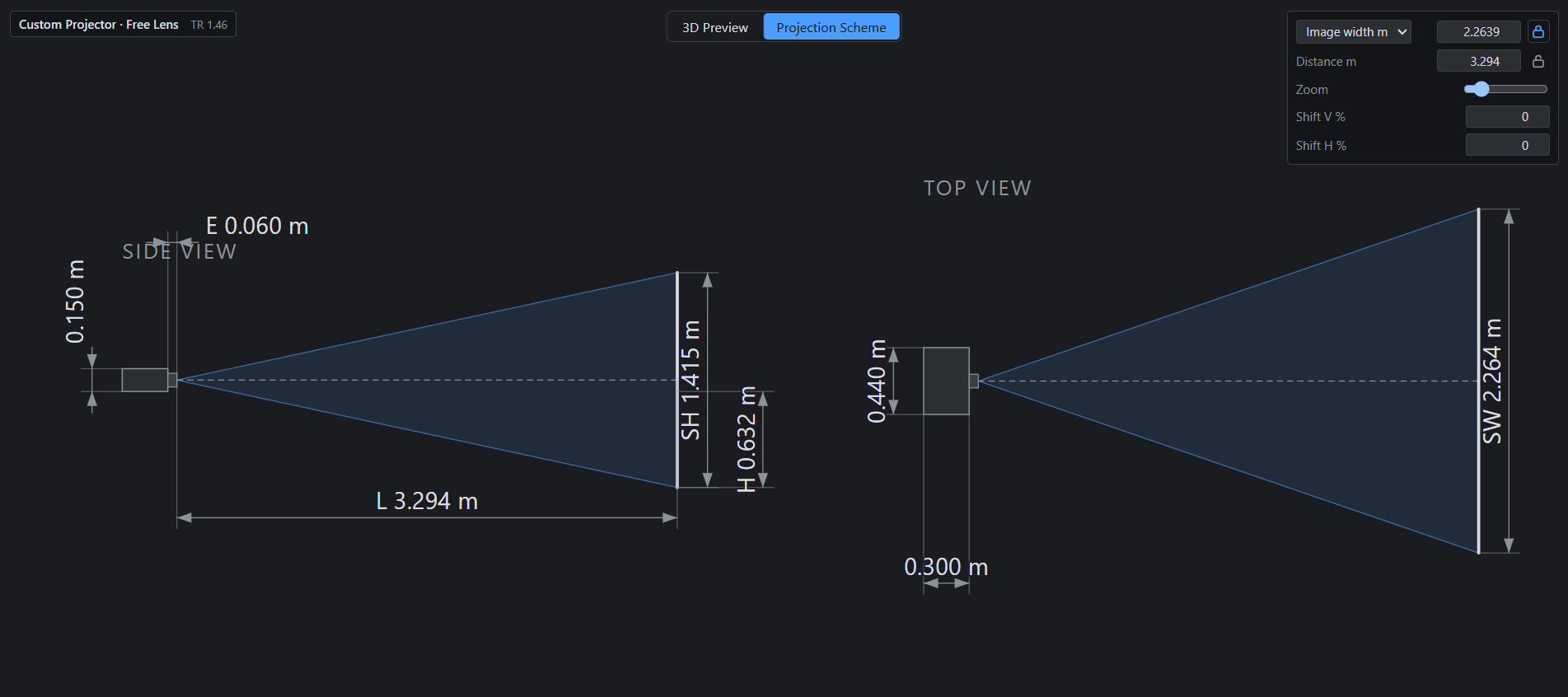
L 1.292 m. The side elevation
dimensions the throw, the image height and the exit; the plan does the same across the room. Both
are drawn from the machine’s own figures, which is why the cabinet’s 0.440 × 0.122 m face and its
0.304 m depth are on the drawing too. The padlock beside the size is the pin: with it down, zoom
moves the distance and leaves the picture alone.Folded lenses are drawn honestly: an ultra-short-throw marks its exit window, a right-angle lens shows the cabinet side-on to the beam, and a rear-throwing lens puts the chassis between the apex and the screen.
The canvas is a viewport, not a picture — the wheel zooms at the cursor while text stays at screen size, dragging pans, each elevation can be moved by its caption, and a double-click refits.